
Active Organizer2.3.1 - Download
You'll be able to download in few seconds.
Publisher Description
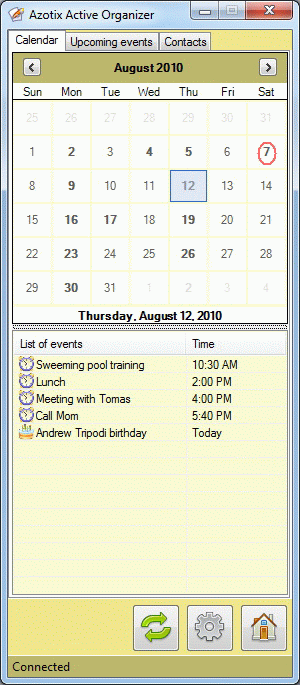
Active Organizer is an easy-to-use desktop client for Google Calendar and Contacts which helps you to manage your Google Calendar and Contacts directly from your Desktop. You can work with multiple calendars at the same time, import and edit shared calendars and manage your Calendars and Contacts offline. Active Organizer provides advanced reminder system, quick search through your contacts and full offline functionality for your Google Apps.
You don't need to be a computer guru to use Active Organizer because of any operation is very simple and can be performed just in two clicks.
It launches automatically when Windows starts and remains in the system tray. You do not need to launch browser every time, just open Active Organizer with one click. Work with events and contacts even when you don't have an Internet connection, Active Organizer automatically updates your Google account then you are online.
The flexible reminder system works even when your browser is not launched or you don't have an Internet connection. You will be notified about missed events and your contacts birthday. You can flexible snooze Google notifications.
Install Active Organizer at work and at home, and sync all of your data between all of your computers.
About Active Organizer
This PIMS & Calendars program is available in English. It was last updated on 29 September, 2026. Active Organizer is compatible with the following operating systems: Windows.
The company that develops Active Organizer is Azotix Software. The latest version released by its developer is 2.3.1.
The download we have available for Active Organizer has a file size of 1.0 MB. Just click the green Download button above to start the downloading process. The program is listed on our website since 2011-05-23 and was downloaded 0 times. We have already checked if the download link is safe, however for your own protection we recommend that you scan the downloaded software with your antivirus. Your antivirus may detect the Active Organizer as malware if the download link is broken.
How to install Active Organizer on your Windows device:
- Click on the Download button on our website. This will start the download from the website of the developer.
- Once the Active Organizer is downloaded click on it to start the setup process (assuming you are on a desktop computer).
- When the installation is finished you should be able to see and run the program.
Program Details
System requirements
Download information
Pricing
Version History
version 2.3.1
posted on 2011-05-23
Added: Address of contact is shown as a Tool Tip.
Added: Information about incorrect credentials is now shown in Status bar.
Modified: Performance of calendar tab was increased.
version 0.3
posted on 2010-04-17
* Added: Event reminders.
* Added: Some User Interface improvements.
* Changes: Minimize button was added on the main window.
* Changes: Active Organizer starts quickly now.
* Minor bugs fixed.
Disclaimer
External Download
We do not host Active Organizer on our servers. We did not scan it for viruses, adware, spyware or other type of malware. This app is hosted by the software publisher and passed their terms and conditions to be listed there. We recommend caution when installing it.
The external download link for Active Organizer is provided to you by apps112.com without any warranties, representations or guarantees of any kind, so access it at your own risk.
If you have questions regarding this particular app contact the publisher directly. For questions about the functionalities of apps112.com contact us.
